


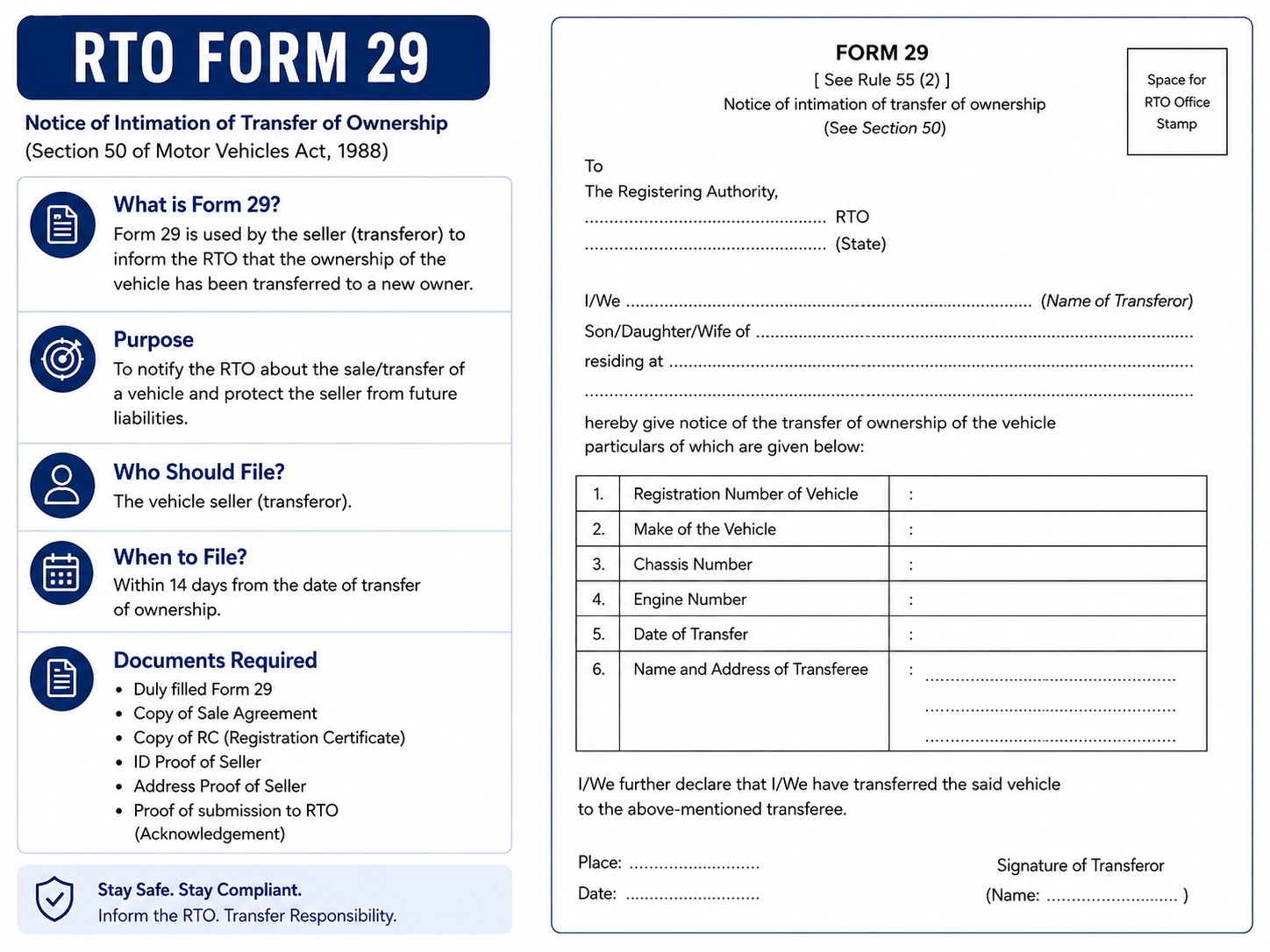
Bought a used car recently, or planning to sell yours? Then there's a good chance you've come across the term "Form 29" somewhere in the process. It's one of those documents nobody really talks about until they actually need it — and by then, it's usually a little confusing. So let's break it down properly, in plain language.
Download Form 25 here
If you want to download other RTO forms click here.
What Exactly Is Form 29?
Form 29 is officially known as the Notice of Transfer of Ownership of a Motor Vehicle. In simple terms, it's the document that tells the RTO, "hey, this vehicle isn't mine anymore, I've sold it." It's filled out and submitted mainly by the seller, and it captures details like the vehicle's registration number, the seller's and buyer's information, the chassis and engine number, and the date the vehicle changed hands.
Here's the thing though — filling out Form 29 alone doesn't complete the ownership transfer. It's really just the seller's official notice. The actual transfer of the Registration Certificate into the buyer's name happens through a related document called Form 30.
Form 29 vs Form 30: What's the Difference?
People mix these two up all the time, so here's the simplest way to remember it:
Form 29 – This is the seller's notice to the RTO that the vehicle has been sold.
Form 30 – This is the buyer's application to get the vehicle registered in their name.
Think of it this way: Form 29 protects the seller by putting it on record that they no longer own the vehicle. Form 30 protects the buyer by giving them legal proof that the car is now theirs. You genuinely need both to complete a proper, legal ownership transfer — submitting just one isn't enough.
Why Does Form 29 Actually Matter?
This one's more important than people realise, especially for the seller.
Until the RC transfer is complete, the vehicle still shows up under your name in RTO records. That means if the new owner runs a red light, gets a challan, or worse, is involved in an accident, your name could still be the one associated with that vehicle. Submitting Form 29 is what starts the process of getting that off your record.
For the buyer, it works as proof that the previous owner has genuinely agreed to hand over the vehicle and has formally notified the RTO about it. It's basically the first official step in making the car legally yours.
When Should You Submit Form 29?
Ideally, right around the time the sale happens — not months later. Once the vehicle changes hands, the buyer is expected to apply for the ownership transfer (Form 30) within 14 days, if the vehicle stays registered in the same state. If it's being transferred to a different state, that window extends to 45 days.
Delaying this isn't just inconvenient, it genuinely puts both parties at risk. The seller stays legally tied to a car they no longer own, and the buyer doesn't have solid proof of ownership yet.
What Other Documents Do You Need Along With It?
Form 29 rarely goes in alone. Along with it, you'll typically need:
1. Form 30 (the buyer's application)
2. Original Registration Certificate
3. Valid insurance certificate
4. Pollution Under Control (PUC) certificate
5. PAN card or Form 60
6. Buyer's address proof
7. Pencil print of the chassis and engine number
8. Passport-size photo of the buyer
9. NOC from the financier, if the car was purchased on loan
Requirements can vary slightly by state, so it's worth double-checking with your local RTO before you head there.
How to Download Form 29
You can get the official Form 29 directly from the government's Parivahan website. Here's the direct link to the PDF:
👉 Download Form 29 (Parivahan Sewa)
If that link ever changes, you can always find it manually: go to parivahan.gov.in, head to "Information Services," click on "Forms," and look for Form 29 under vehicle-related forms.
Filling Out Form 29: What to Keep in Mind
A few things that genuinely matter here — the details you enter should exactly match what's on your RC, insurance, and address proof. Even small mismatches, like a spelling difference in a name, can hold up the entire process. Make sure the seller's signature is included, and if the vehicle was financed, don't forget to add the financier's details.
A Quick Note on Form 29C
There's also a lesser-known cousin of this form called Form 29C, and it's easy to confuse the two. Form 29C is used specifically when a vehicle owner hands over their car to an authorised vehicle dealer, rather than selling it directly to another individual. If you're selling privately, buyer to buyer, Form 29 (along with Form 30) is what you need — not 29C.
Common Mistakes People Make
A little care here saves a lot of hassle later. Watch out for:
1. Entering the wrong registration number
2. Names not matching across documents
3. Forgetting the seller's signature
4. Submitting Form 29 without following through with Form 30
5. Ignoring an existing loan or hypothecation on the vehicle
6. Not keeping a copy of the submitted form for your own records
Final Word
Form 29 might feel like just another piece of paperwork, but it plays a genuinely important role in protecting both the buyer and the seller during a car transfer. If you're selling your car, don't just hand over the keys and call it done — make sure Form 29 is filed, and follow through until the RC transfer is actually complete. And if you're buying, don't skip this step either; it's what makes the vehicle legally yours. You can also connect to Upride in case of any assistance required. If you want to download other RTO forms click here.